Controlling the Agent#
This section explains how to create programs for controlling an agent.
About Agent Control#
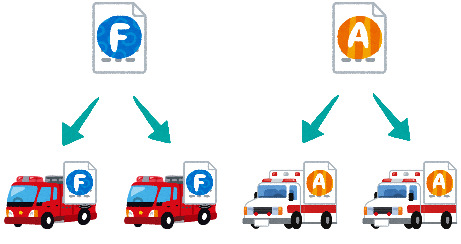
There are three types of disaster rescue agents in RRS, and a different program is required for each type. However, writing all of the programs from scratch is difficult. First, let’s write part of a program that controls a fire brigade agent.
Note
Programs that control agents are the same for each agent type. The program is distributed to each agent and controls only that agent. If you write a program for a fire brigade agent, it will run on every fire brigade agent.
Agent Operation Flow#
The program that determines the agent’s behavior is called Tactics.
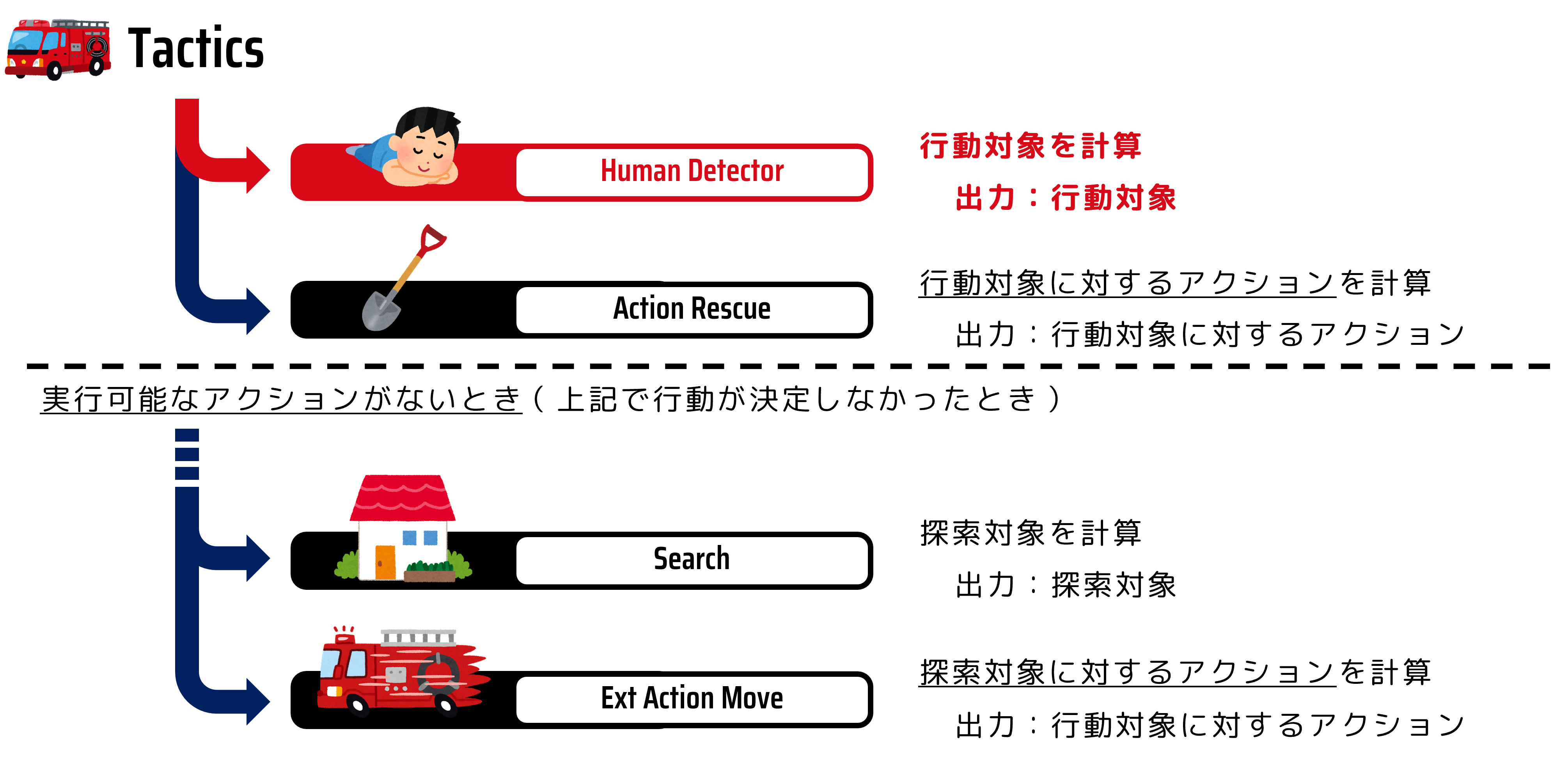
The fire brigade’s decision-making routine is roughly as shown in the figure below. As fire brigade behavior, it first searches for citizens to rescue (Human Detector) and rescues any citizens it finds (Action Rescue). If no citizen to rescue is found, it changes the search location and determines the next search location (Search) and moves there (Action Ext move). Note that an agent cannot move and perform rescue actions at the same time within a single step. In other words, it checks information around itself that is updated every step and decides both the action target and the action to perform. Each of these functions is separated and represented as a program called a module.
In this tutorial, we will develop the Human Detector module, which determines rescue (dig-out) targets.
Preparing to Implement the Human Detector Module#
First, create the file for the Human Detector module.
cd WORKING_DIR/<your_team_name>
touch src/<your_team_name>/module/complex/fire_brigade_human_detector.py
Next, implement the template for the Human Detector module. Write the following code in fire_brigade_human_detector.py.
from typing import Optional

from adf_core_python.core.agent.develop.develop_data import DevelopData
from adf_core_python.core.agent.info.agent_info import AgentInfo
from adf_core_python.core.agent.info.scenario_info import ScenarioInfo
from adf_core_python.core.agent.info.world_info import WorldInfo
from adf_core_python.core.agent.module.module_manager import ModuleManager
from adf_core_python.core.component.module.complex.human_detector import HumanDetector
from adf_core_python.core.logger.logger import get_agent_logger
from rcrscore.entities import EntityID


class FireBrigadeHumanDetector(HumanDetector):
    def __init__(
        self,
        agent_info: AgentInfo,
        world_info: WorldInfo,
        scenario_info: ScenarioInfo,
        module_manager: ModuleManager,
        develop_data: DevelopData,
    ) -> None:
        super().__init__(
            agent_info, world_info, scenario_info, module_manager, develop_data
        )
        # 計算結果を格納する変数
        self._result: Optional[EntityID] = None
        # ロガーの取得
        self._logger = get_agent_logger(
            f"{self.__class__.__module__}.{self.__class__.__qualname__}",
            self._agent_info,
        )

    def calculate(self) -> HumanDetector:
        """
        行動対象を決定する

        Returns
        -------
            HumanDetector: 自身のインスタンス
        """
        self._logger.info("Calculate FireBrigadeHumanDetector")
        return self

    def get_target_entity_id(self) -> Optional[EntityID]:
        """
        行動対象のEntityIDを取得する

        Returns
        -------
            Optional[EntityID]: 行動対象のEntityID
        """
        return self._result
Registering the Module#
Next, register the module you created.
Open the WORKING_DIR/<your_team_name>/config/module.yaml file and change the following section
DefaultTacticsFireBrigade:
  HumanDetector: src.<your_team_name>.module.complex.sample_human_detector.SampleHumanDetector
as follows.
DefaultTacticsFireBrigade:
  HumanDetector: src.<your_team_name>.module.complex.fire_brigade_human_detector.FireBrigadeHumanDetector
Open two terminals.
Open one terminal and start the simulation server with the following command:
# Terminal A
cd WORKING_DIR/rcrs-server/scripts
./start-comprun.sh -m ../maps/tutorial_fire_brigade_only/map -c ../maps/tutorial_fire_brigade_only/config
Then open another terminal and start the agent:
# Terminal B
cd WORKING_DIR/<your_team_name>
python main.py
If Calculate FireBrigadeHumanDetector is shown in standard output, it was successful.
Designing the Human Detector Module#
Write the rescue-target selection logic and modify it so that the fire brigade agent can perform rescue operations.
The simplest way to select a rescue target for a fire brigade agent is to choose the nearest buried civilian. In this tutorial, let’s write an action-target selection module for fire brigade agents that uses this approach.
The method of selecting the nearest buried civilian as the rescue target is shown in the flowchart below.
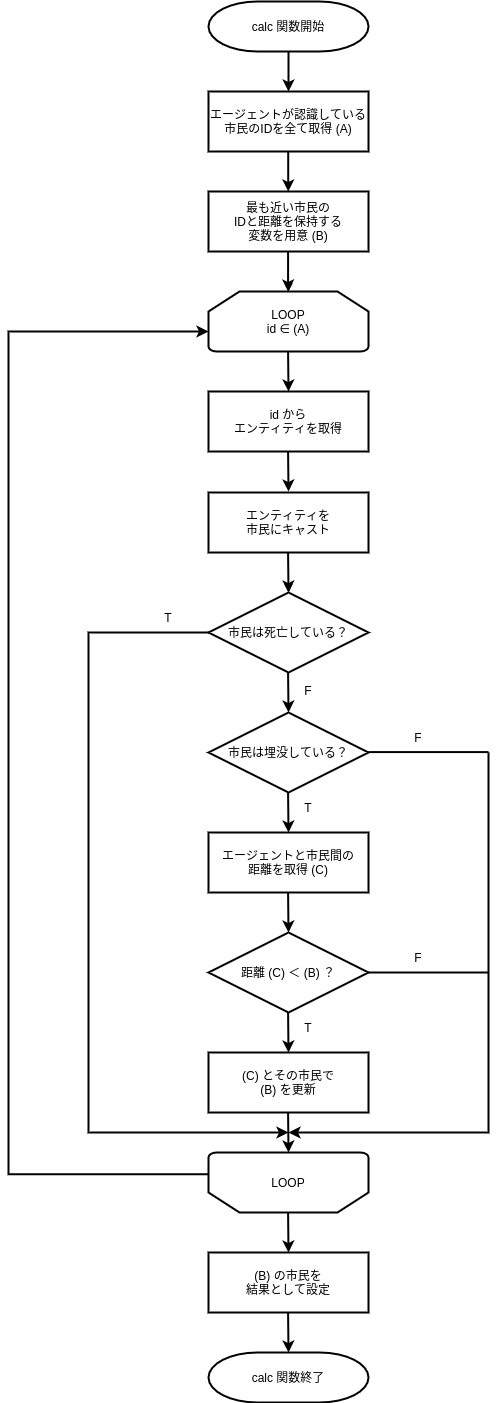
By replacing each process in this flowchart with the classes and methods introduced in the next subsection and implementing them in fire_brigade_human_detector.py, you will complete the rescue-target selection program.
Classes and Methods Used in the Human Detector Module#
Entity#
The Entity class is the base class for entities. This class stores basic entity information.
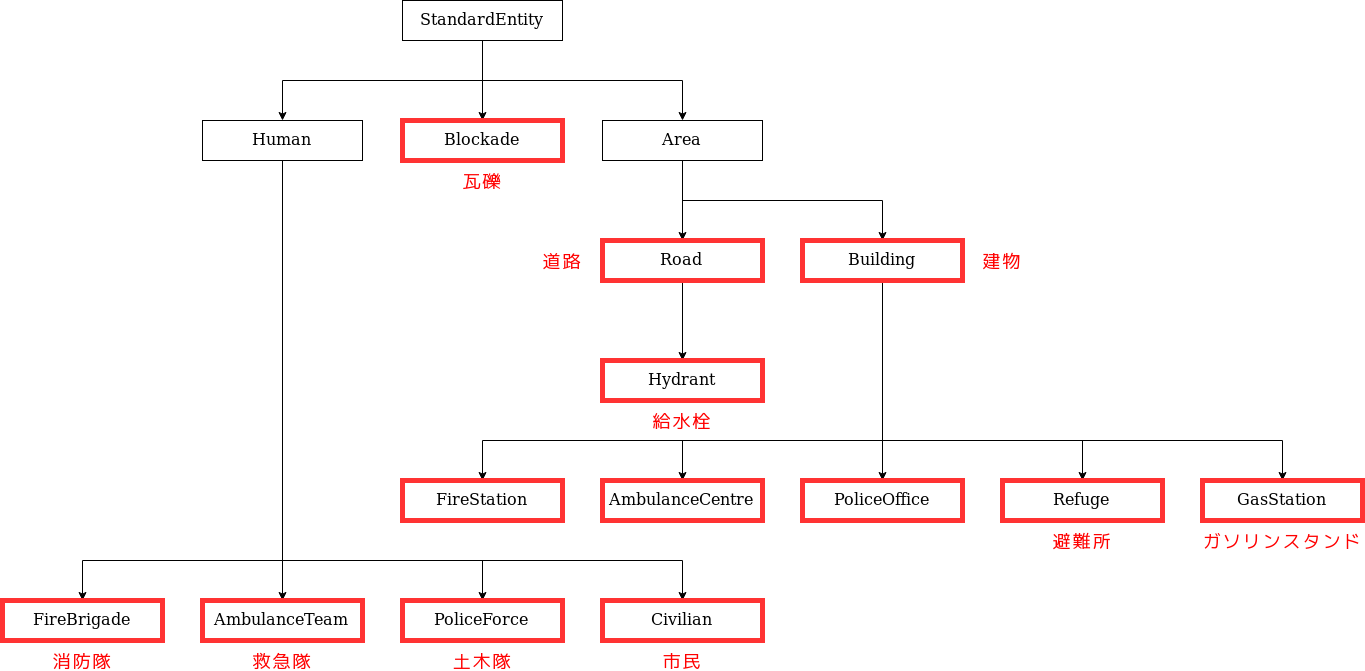
Entities in RRS are represented by classes that inherit from Entity, as shown in the figure below. The classes enclosed in red frames directly represent RRS components as their names imply.
Example: Some instances of the Road class represent normal roads that do not inherit from the Hydrant class.
EntityID#
The EntityID class represents an ID (identifier) used to uniquely identify all agents and objects. In RRS, agents and objects are collectively called entities.
Civilian#
The Civilian class represents civilians. This class allows you to obtain a civilian’s location and injury progression status.
Determine whether
entityis a civilian
is_civilian: bool = isinstance(entity, Civilian)
Get the entity ID
entity_id: EntityID = entity.get_id()
Determine whether the civilian is alive
hp: Optional[int] = entity.get_hp()
if hp is None or hp <= 0:
    return False
Determine whether the civilian is buried
buriedness: Optional[int] = entity.get_buriedness()
if buriedness is None or buriedness <= 0:
    return False
WorldInfo#
The WorldInfo class contains information known to the agent and methods to operate on that information. Through this class, the agent checks the states of other agents and objects.
Inside the module, an instance of WorldInfo is stored as self._world_info.
Get an entity from an entity ID
entity: Entity = self._world_info.get_entity(entity_id)
Get all entities of a specified class
entities: list[Entity] = self._world_info.get_entities_by_type([Building, Road])
Get the distance from the agent’s position to a specified entity
distance: float = self._world_info.get_distance(me, civilian.get_id())
AgentInfo#
The AgentInfo class contains information about the agent itself and methods to operate on that information. Through this class, the agent obtains its own state.
Inside the module, an instance of AgentInfo is stored as self._agent_info.
Get your own entity ID
my_entity_id: EntityID = self._agent_info.get_entity_id()
Implementing the Human Detector Module#
Now implement the Human Detector module. Write the following code in fire_brigade_human_detector.py.
from typing import Optional

from adf_core_python.core.agent.develop.develop_data import DevelopData
from adf_core_python.core.agent.info.agent_info import AgentInfo
from adf_core_python.core.agent.info.scenario_info import ScenarioInfo
from adf_core_python.core.agent.info.world_info import WorldInfo
from adf_core_python.core.agent.module.module_manager import ModuleManager
from adf_core_python.core.component.module.complex.human_detector import HumanDetector
from adf_core_python.core.logger.logger import get_agent_logger
from rcrscore.entities import Civilian, Entity, EntityID


class FireBrigadeHumanDetector(HumanDetector):
    def __init__(
        self,
        agent_info: AgentInfo,
        world_info: WorldInfo,
        scenario_info: ScenarioInfo,
        module_manager: ModuleManager,
        develop_data: DevelopData,
    ) -> None:
        super().__init__(
            agent_info, world_info, scenario_info, module_manager, develop_data
        )
        # 計算結果を格納する変数
        self._result: Optional[EntityID] = None
        # ロガーの取得
        self._logger = get_agent_logger(
            f"{self.__class__.__module__}.{self.__class__.__qualname__}",
            self._agent_info,
        )

    def calculate(self) -> HumanDetector:
        """
        行動対象を決定する

        Returns
        -------
            HumanDetector: 自身のインスタンス
        """
        # 自分自身のEntityIDを取得
        me: EntityID = self._agent_info.get_entity_id()
        # すべてのCivilianを取得
        civilians: list[Entity] = self._world_info.get_entities_of_types(
            [
                Civilian,
            ]
        )

        # 最も近いCivilianを探す
        nearest_civilian: Optional[EntityID] = None
        nearest_distance: Optional[float] = None
        for civilian in civilians:
            # civilianがCivilianクラスのインスタンスでない場合はスキップ
            if not isinstance(civilian, Civilian):
                continue

            # civilianのHPが0以下の場合はすでに死んでしまっているのでスキップ
            if civilian.get_hp() <= 0:
                continue

            # civilianの埋没度が0以下の場合は掘り起こす必要がないのでスキップ
            if civilian.get_buriedness() <= 0:
                continue

            # 自分自身との距離を計算
            distance: float = self._world_info.get_distance(me, civilian.get_id())

            # 最も近いCivilianを更新
            if nearest_distance is None or distance < nearest_distance:
                nearest_civilian = civilian.get_id()
                nearest_distance = distance

        # 計算結果を格納
        self._result = nearest_civilian

        # ロガーに出力
        self._logger.info(f"Target: {self._result}")

        return self

    def get_target_entity_id(self) -> Optional[EntityID]:
        """
        行動対象のEntityIDを取得する

        Returns
        -------
            Optional[EntityID]: 行動対象のEntityID
        """
        return self._result
Open two terminals.
Open one terminal and start the simulation server with the following command:
# Terminal A
cd WORKING_DIR/rcrs-server/scripts
./start-comprun.sh -m ../maps/tutorial_fire_brigade_only/map -c ../maps/tutorial_fire_brigade_only/config
Then open another terminal and start the agent:
# Terminal B
cd WORKING_DIR/<your_team_name>
python main.py
It is successful if fire brigade agents can rescue buried civilians.