Clustering Module#
Purpose of the Clustering Module#
When running multiple agents, it is important to decide how they should cooperate. In RRS, many teams use a form of cooperation in which each agent is assigned its own area of responsibility and work is divided accordingly (they also use other forms of cooperation). To assign those areas, you need to divide the objects on the map into several groups. A module called a clustering module is used when creating and managing these groups.
In this guide, we will implement a clustering module using the algorithm employed by many teams that compete in world championship events.
Overview of the Clustering Module to Be Developed#
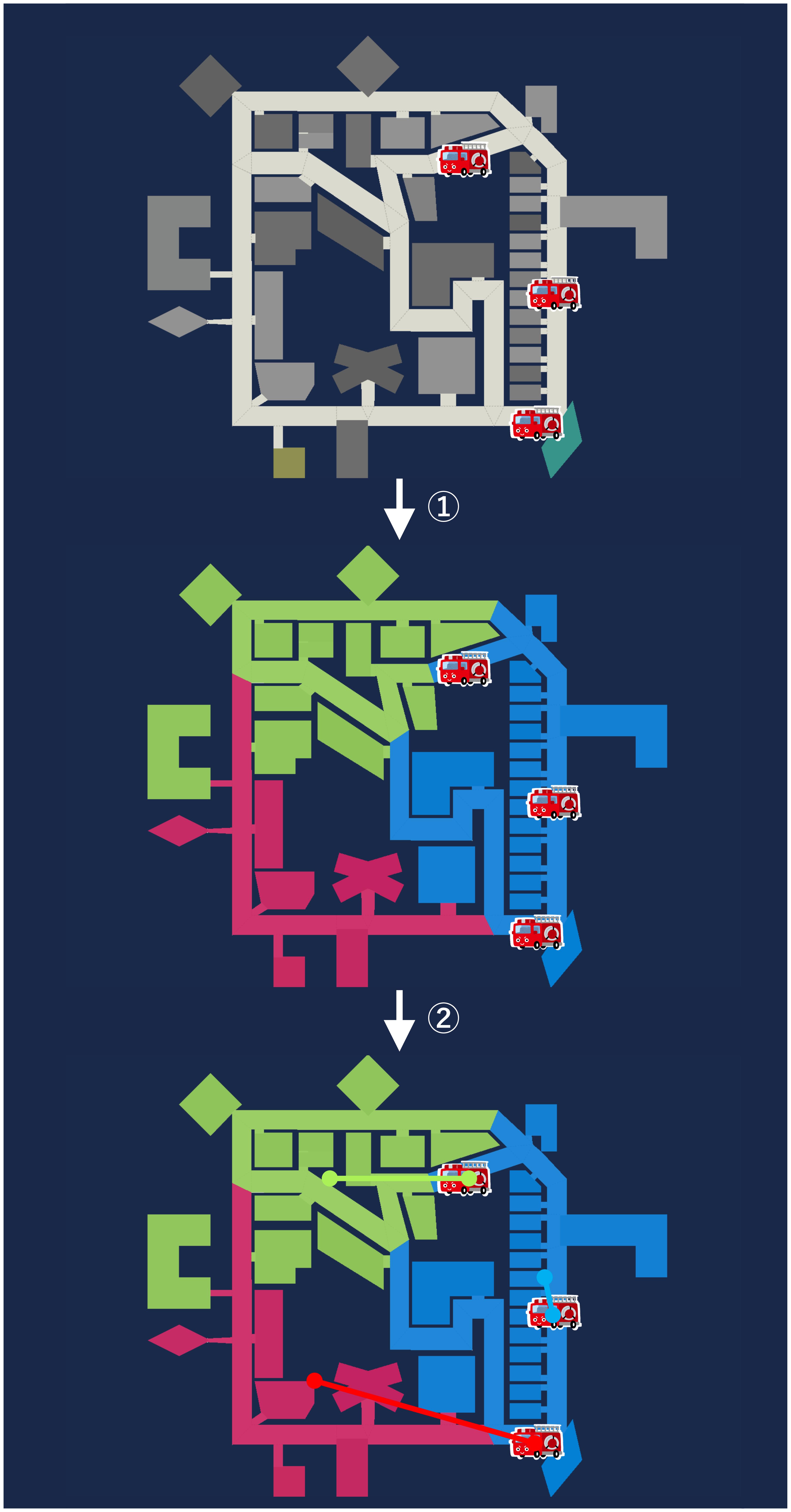
The module developed in this guide will work as shown in the image below:
It divides the objects on the map into as many regions as there are agents using the k-means++ algorithm.
It then pairs those regions with the agents one-to-one using the Hungarian algorithm so that the total distance between them is minimized.
Implementing the Clustering Module#
Note
The following steps assume that the current directory is the project root directory.
First, create the file for the clustering module.
mkdir -p src/<your_team_name>/module/algorithm
touch src/<your_team_name>/module/algorithm/k_means_pp_clustering.py
Next, implement the clustering module. Write the following code in k_means_pp_clustering.py.
import numpy as np
from adf_core_python.core.agent.develop.develop_data import DevelopData
from adf_core_python.core.agent.info.agent_info import AgentInfo
from adf_core_python.core.agent.info.scenario_info import ScenarioInfo, ScenarioInfoKeys
from adf_core_python.core.agent.info.world_info import WorldInfo
from adf_core_python.core.agent.module.module_manager import ModuleManager
from adf_core_python.core.component.module.algorithm.clustering import Clustering
from adf_core_python.core.logger.logger import get_logger
from rcrscore.entities import (
    AmbulanceCenter,
    Building,
    Entity,
    EntityID,
    FireStation,
    GasStation,
    Hydrant,
    PoliceOffice,
    Refuge,
    Road,
)
from rcrscore.urn import EntityURN
from scipy.optimize import linear_sum_assignment
from sklearn.cluster import KMeans

# クラスタリングのシード値
SEED = 42


class KMeansPPClustering(Clustering):
    def __init__(
        self,
        agent_info: AgentInfo,
        world_info: WorldInfo,
        scenario_info: ScenarioInfo,
        module_manager: ModuleManager,
        develop_data: DevelopData,
    ) -> None:
        super().__init__(
            agent_info, world_info, scenario_info, module_manager, develop_data
        )
        # ロガーの取得
        self._logger = get_logger(f"{self.__class__.__name__}")

        # クラスター数の設定
        self._cluster_number: int = 1

        me = agent_info.get_myself()
        if not me:
            self._logger.error("Myself entity is None.")
            return

        match me.get_urn():
            # エージェントのクラスに応じてクラスター数を設定
            case EntityURN.AMBULANCE_TEAM:
                self._cluster_number = scenario_info.get_value(
                    ScenarioInfoKeys.SCENARIO_AGENTS_AT,
                    1,
                )
            case EntityURN.POLICE_FORCE:
                self._cluster_number = scenario_info.get_value(
                    ScenarioInfoKeys.SCENARIO_AGENTS_PF,
                    1,
                )
            case EntityURN.FIRE_BRIGADE:
                self._cluster_number = scenario_info.get_value(
                    ScenarioInfoKeys.SCENARIO_AGENTS_FB,
                    1,
                )

        # 自分と同じクラスのエージェントのリストを取得
        self._agents: list[Entity] = world_info.get_entities_of_types(
            [
                me.__class__,
            ]
        )

        # クラスタリング結果を保持する変数
        self._cluster_entities: list[list[Entity]] = []

        # クラスタリング対象のエンティティのリストを取得
        self._entities: list[Entity] = world_info.get_entities_of_types(
            [
                AmbulanceCenter,
                FireStation,
                GasStation,
                Hydrant,
                PoliceOffice,
                Refuge,
                Road,
                Building,
            ]
        )

    def calculate(self) -> Clustering:
        return self

    def get_cluster_number(self) -> int:
        """
        クラスター数を取得する

        Returns
        -------
        int
            クラスター数
        """
        return self._cluster_number

    def get_cluster_index(self, entity_id: EntityID) -> int:
        """
        エージェントに割り当てられたクラスターのインデックスを取得する

        Parameters
        ----------
        entity_id : EntityID
            エージェントのID

        Returns
        -------
        int
            クラスターのインデックス
        """
        return self._agent_cluster_indices.get(entity_id, 0)

    def get_cluster_entities(self, cluster_index: int) -> list[Entity]:
        """
        クラスターのエンティティのリストを取得する

        Parameters
        ----------
        cluster_index : int
            クラスターのインデックス

        Returns
        -------
        list[Entity]
            クラスターのエンティティのリスト
        """
        if cluster_index >= len(self._cluster_entities):
            return []
        return self._cluster_entities[cluster_index]

    def get_cluster_entity_ids(self, cluster_index: int) -> list[EntityID]:
        """
        クラスターのエンティティのIDのリストを取得する

        Parameters
        ----------
        cluster_index : int
            クラスターのインデックス

        Returns
        -------
        list[EntityID]
            クラスターのエンティティのIDのリスト
        """
        if cluster_index >= len(self._cluster_entities):
            return []
        return [
            entity.get_entity_id() for entity in self._cluster_entities[cluster_index]
        ]

    def prepare(self) -> Clustering:
        """
        エージェントの起動時に一回のみ実行される処理
        """
        super().prepare()
        if self.get_count_prepare() > 1:
            return self

        # クラスタリングを実行
        kmeans_pp = self._perform_kmeans_pp(self._entities, self._cluster_number)

        # クラスタリング結果を保持
        self._cluster_entities = [[] for _ in range(self._cluster_number)]
        for entity, cluster_index in zip(self._entities, kmeans_pp.labels_):
            self._cluster_entities[cluster_index].append(entity)

        # エージェントとクラスターのエンティティの距離を計算し、最も全体の合計の距離が短くなるようにエージェントとクラスターを対応付ける
        agent_cluster_indices = self._agent_cluster_assignment(
            self._agents, kmeans_pp.cluster_centers_
        )

        # エージェントとクラスターの対応付け結果を保持
        self._agent_cluster_indices = {
            entity.get_entity_id(): cluster_index
            for entity, cluster_index in zip(self._agents, agent_cluster_indices)
        }

        # デバッグ用のログ出力
        self._logger.info(
            f"Clustered entities: {[[entity.get_entity_id().get_value() for entity in cluster] for cluster in self._cluster_entities]}"
        )

        self._logger.info(
            f"Agent cluster indices: {[([e.get_x(), e.get_y()] if (e is not None and e.get_x() is not None and e.get_y() is not None) else [None, None], int(cluster_index)) for entity_id, cluster_index in self._agent_cluster_indices.items() for e in (self._world_info.get_entity(entity_id),)]}"
        )

        return self

    def _perform_kmeans_pp(self, entities: list[Entity], n_clusters: int = 1) -> KMeans:
        """
        K-means++法によるクラスタリングを実行する

        Parameters
        ----------
        entities : list[Entity]
            クラスタリング対象のエンティティのリスト

        n_clusters : int, optional
            クラスター数, by default 1

        Returns
        -------
        KMeans
            クラスタリング結果
        """
        entity_positions: np.ndarray = np.array(
            [
                [entity.get_x(), entity.get_y()]
                for entity in entities
                if entity.get_x() is not None and entity.get_y() is not None
            ]
        )

        entity_positions = entity_positions.reshape(-1, 2)
        kmeans_pp = KMeans(
            n_clusters=n_clusters,
            init="k-means++",
            random_state=SEED,
        )
        kmeans_pp.fit(entity_positions)
        return kmeans_pp

    def _agent_cluster_assignment(
        self, agents: list[Entity], cluster_positions: np.ndarray
    ) -> np.ndarray:
        """
        エージェントとクラスターの対応付けを行う

        Parameters
        ----------
        agents : list[Entity]
            エージェントのリスト

        cluster_positions : np.ndarray
            クラスターの位置のリスト

        Returns
        -------
        np.ndarray
            エージェントとクラスターの対応付け結果
        """
        # エージェントの位置のリストを取得
        agent_positions = np.array(
            [
                [agent.get_x(), agent.get_y()]
                for agent in agents
                if agent.get_x() is not None and agent.get_y() is not None
            ]
        )

        # エージェントとクラスターの距離行列を計算
        agent_positions = agent_positions.reshape(-1, 2)
        cost_matrix = np.linalg.norm(
            agent_positions[:, np.newaxis] - cluster_positions, axis=2
        )
        # ハンガリアンアルゴリズムによりエージェントとクラスターの対応付けを行う
        _, col_ind = linear_sum_assignment(cost_matrix)
        return col_ind
The k-means++ implementation uses scikit-learn’s KMeans class. The KMeans class clusters objects on the map according to the number of clusters specified by n_clusters. The clustering result is stored in the labels_ attribute. The center coordinates of each cluster are stored in the cluster_centers_ attribute.
The Hungarian algorithm implementation uses SciPy’s linear_sum_assignment function. linear_sum_assignment takes a cost matrix as input and performs the optimal assignment.
Next, register the module you created. Edit config/module.yaml as follows.
SampleSearch:
  PathPlanning: adf_core_python.implement.module.algorithm.a_star_path_planning.AStarPathPlanning
  Clustering: src.<your_team_name>.module.algorithm.k_means_pp_clustering.KMeansPPClustering

SampleHumanDetector:
  Clustering: src.<your_team_name>.module.algorithm.k_means_pp_clustering.KMeansPPClustering
Open two terminals.
Open one terminal and start the simulation server with the following command:
# Terminal A
cd WORKING_DIR/rcrs-server/scripts
./start-comprun.sh -m ../maps/tutorial_ambulance_team_only/map -c ../maps/tutorial_ambulance_team_only/config
Then open another terminal and start the agent:
# Terminal B
cd WORKING_DIR/<your_team_name>
python main.py
When the agent starts, the clustering result is printed to standard output.
[info     ] Clustered entities: [[257, 259, 262, 263, 270, 278, 280, 297, 336, 913, 914, 915, 916, 917, 918, 919, 933, 941, 942, 943, 944, 945, 946, 947, 974, 250, 253], [349, 896, 899, 902, 934, 960, 968, 969, 970, 971, 248, 251], [258, 266, 268, 269, 274, 275, 279, 920, 921, 922, 923, 924, 925, 926, 927, 928, 929, 932, 948, 949, 950, 951, 952, 953, 954, 955, 956, 957, 958, 959, 975, 976, 254, 255], [256, 271, 273, 281, 296, 298, 314, 330, 903, 904, 905, 910, 911, 912, 935, 936, 937, 938, 939, 940, 247, 249]] [KMeansPPClustering]
[info     ] Agent cluster indices: [([89544, 19925], 1), ([69989, 120063], 0), ([130029, 50380], 2), ([29898, 59056], 3)] [KMeansPPClustering]
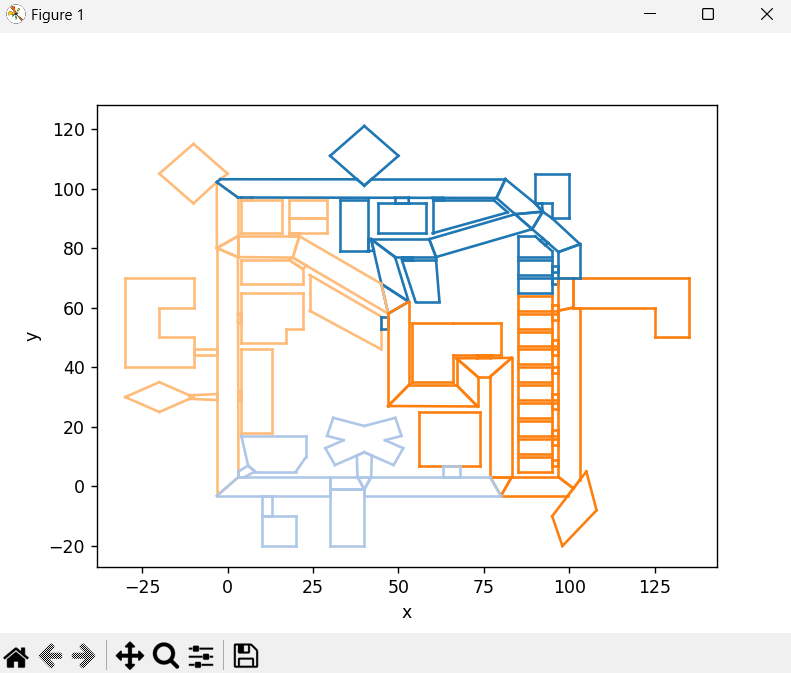
As it stands, the clustering result is hard to understand, so let’s display it on the map.
Download and extract the cluster visualization script, then paste the following into the relevant part of main.py inside it.
# クラスタリング結果
clusters = []
Copy and paste the array that appears after Clustered entities: in the output.
Example
# クラスタリング結果
clusters = [[257, 259, 262, 263, 270, 278, 280, 297, 336, 913, 914, 915, 916, 917, 918, 919, 933, 941, 942, 943, 944, 945, 946, 947, 974, 250, 253], [349, 896, 899, 902, 934, 960, 968, 969, 970, 971, 248, 251], [258, 266, 268, 269, 274, 275, 279, 920, 921, 922, 923, 924, 925, 926, 927, 928, 929, 932, 948, 949, 950, 951, 952, 953, 954, 955, 956, 957, 958, 959, 975, 976, 254, 255], [256, 271, 273, 281, 296, 298, 314, 330, 903, 904, 905, 910, 911, 912, 935, 936, 937, 938, 939, 940, 247, 249]]
After pasting it, run the following command.
pip install -r requirements.txt
python main.py
An image like the following will be generated.